
45k Star,一纸脚本搞定 HTTPS,实现证书永久自动续期!
acme.sh 是一个纯 Shell 实现的 ACME 协议客户端,用于自动申请、续期和部署 SSL/TLS 证书,支持 Let’s Encrypt、ZeroSSL 等 CA,适合在服务器上做「零人工」的证书管理。
一、项目简介
- 仓库:acmesh-official/acme.sh
- 协议:ACME(如 RFC 8555)
- 语言:Unix Shell(Bash / dash / sh)
- 许可:GPL-3.0
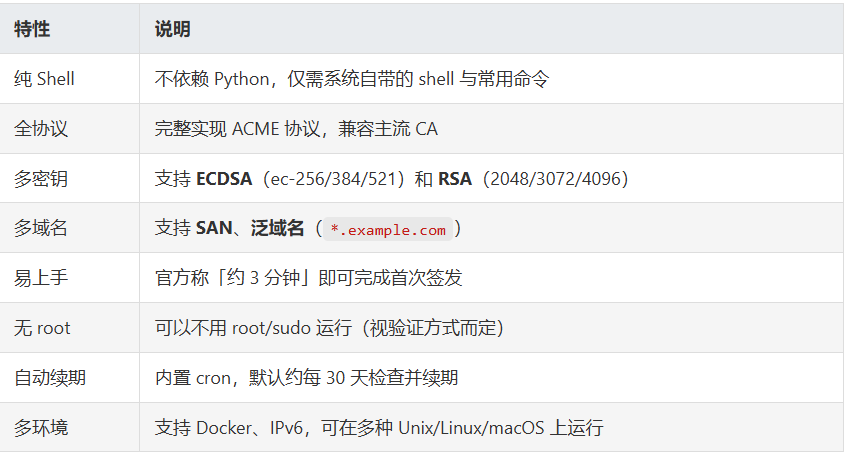
二、核心特性
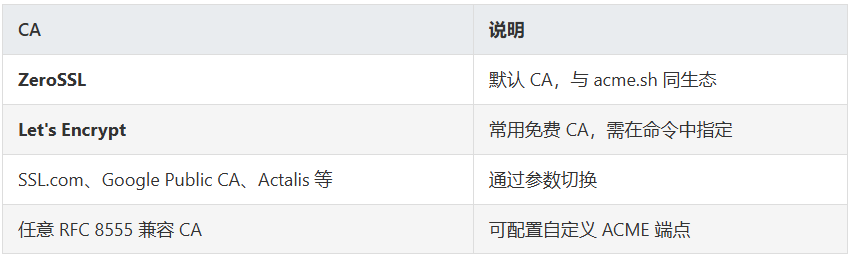
三、支持的 CA(证书颁发机构)
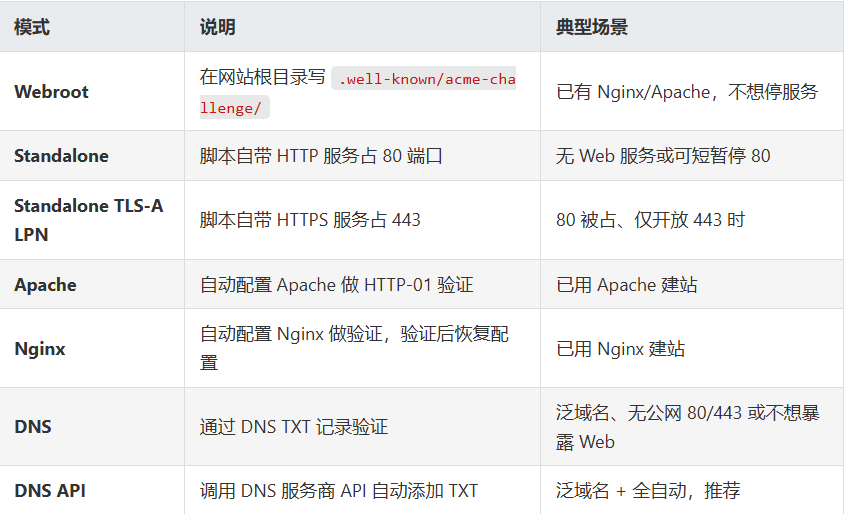
四、验证与部署
五、安装
5.1 在线安装(推荐)
1 | curl https://get.acme.sh | sh -s email=my@example.com |
或使用 wget:
1 | wget -O - https://get.acme.sh | sh -s email=my@example.com |
将 my@example.com 换成你的邮箱,用于 CA 通知与账户关联。
5.2 从 Git 安装
1 | git clone https://github.com/acmesh-official/acme.sh.gitcd acme.sh./acme.sh --install -m my@example.com |
安装完成后会:在 ~/.acme.sh/ 下放置脚本与证书;为当前用户创建 acme.sh 命令别名;添加每日检查续期的 cron。
注意:安装后需重新打开终端或执行 source ~/.bashrc(或对应 shell 配置)后,acme.sh 命令才会生效。
六、签发证书用法
6.1 单域名(Webroot)
1 | acme.sh --issue -d example.com -w /home/wwwroot/example.com |
-w 为网站根目录,脚本会在该目录下创建 /.well-known/acme-challenge/ 并完成 HTTP-01 验证。
6.2 多域名(同一张证书)
1 | acme.sh --issue -d example.com -d www.example.com -d cp.example.com -w /home/wwwroot/example.com |
6.3 仅本机、无 Web 服务(Standalone)
需确保 80 端口空闲(或使用 --alpn 时 443 空闲):
1 | acme.sh --issue --standalone -d example.com -d www.example.com |
6.4 泛域名(DNS API 示例:Cloudflare)
1 | export CF_Token="你的_API_Token"export CF_Account_ID="你的_Account_ID"acme.sh --issue -d example.com -d '*.example.com' --dns dns_cf |
其他 DNS 厂商见官方 dnsapi 列表。
6.5 证书与密钥类型
默认:**ECC (ec-256)**。指定类型示例:ECDSA P-384 用 --keylength ec-384,RSA 4096 用 --keylength 4096。
七、将证书安装到 Nginx / Apache
证书续期后需要复制到固定路径并重载服务,用 --install-cert 可把「复制 + 重载」写成一条命令,并由 cron 在续期后自动执行。
Nginx 示例:
1 | acme.sh --install-cert -d example.com \ --key-file /path/to/nginx/key.pem \ --fullchain-file /path/to/nginx/cert.pem \ --reloadcmd "service nginx force-reload" |
Apache 示例:
1 | acme.sh --install-cert -d example.com \ --cert-file /path/to/apache/cert.pem \ --key-file /path/to/apache/key.pem \ --fullchain-file /path/to/apache/fullchain.pem \ --reloadcmd "service apache2 force-reload" |
重要:--reloadcmd 非常关键——续期后 acme.sh 会执行它,使 Nginx/Apache 加载新证书。若缺少 --reloadcmd,续期了但服务未重载,浏览器仍会看到旧证书。
八、续期与日常维护
自动续期
:安装时已加 cron,默认约每 30 天检查并续期,无需人工操作。
强制续期
(测试或紧急更新):
acme.sh --renew -d example.com --force停止续期
(只从续期列表移除,不删磁盘上的证书):
acme.sh --remove -d example.com升级 acme.sh
:
acme.sh --upgrade;开启/关闭自动升级:acme.sh --upgrade --auto-upgrade/acme.sh --upgrade --auto-upgrade 0
九、谁在用 acme.sh?
包括:FreeBSD.org、Proxmox、pfsense、Loadbalancer.org、Discourse、Centminmod、OpenWRT 等,说明在真实生产与嵌入式环境中都有使用。
十、注意事项
Webroot
:确保对
-w目录有写权限,且 Nginx/Apache 已正确配置对该路径的访问(例如location /.well-known/acme-challenge/)。Standalone
:签发时 80(或 443)必须空闲,必要时先停掉 Nginx/Apache。
DNS 手动模式
:需每次续期时手动改 TXT,无法全自动,建议优先用 DNS API。
生产用证
:始终通过
--install-cert把证书安装到固定路径,并用--reloadcmd重载服务,不要直接依赖~/.acme.sh/里的文件路径。
源码地址:https://github.com/acmesh-official/acme.sh
本文转自 https://mp.weixin.qq.com/s/zxSG5sGh2HPlF6FwqgC4PQ,如有侵权,请联系删除。